This page is documenting some toonshader based on my knowledge.
2.5D performance1(used planes to multiply):
the main scene:
- full screnn render feature (renderer3D)
- background(RT,transparent,queue = 3000-2)
- character(toonshader + custom RT filter transparent,queue = 3000-1)
- FX layer(plane transparent queue = 3000)
- LightFX
all process is animated available to achieve the performance(with naninovel frame, and I try to learn that, too.) (but I think it seemed to be over...?)
at the same time I am exploring some new postprocess, too.(But time and efficiency push some stress on me:)
basically naninovel and urp, but I take the 3D asset(character from Vroid then blender to handle further)
and so there is still some performance trick about various useing methods of render texture...etc(please ignore my poor language skill...)
explore post process utils:
post process pencil
post process pencil / draft(learn from camerafilterpackage)
RTfilter(to stimulate the black and white edge with the painter algorithm)
toon shader(learn from unity toon)
- lerp
- color
- normal outline(I hate this)
- rimcolor with mask(I like this)
- chroma split
face / liuhai
- stencil NO:2
- comparison: always
- pass: replace
- fail: keep
eyeline/brown:
- stencil NO:2
- comparison: always
still bugs...I try to figure out some better ways to achieve the perfect angle 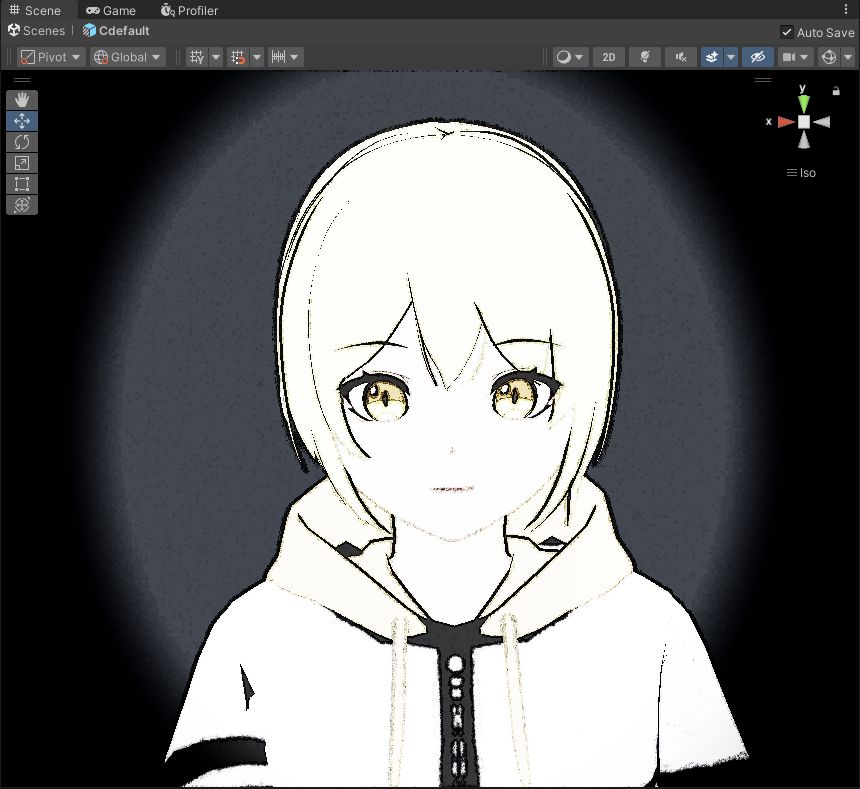 (this photo do NOT adjust the toon shader yet) (but i like it)
some 3D render
color
basecolor
light color
simple vrchat mobile : #if defined(_LIGHTCOLOR_ON) Light mainLight = GetMainLight(); half3 ambientTint = SampleSH(half4(0.0h, 0.0h, 0.0h, 1.0h)).rgb * 0.2h; half3 lightTint = mainLight.color * (mainLight.distanceAttenuation * mainLight.shadowAttenuation); half3 tint = max(ambientTint, lightTint); outColor.rgb *= tint; #endif
shading shadow
(smooth)step 2/3....(n)? sphere function... lambert
outline plan
normal
- camera
sobel
z
highlight
blinnphong pow
GGX half vector
(aniso)
rimlight
inner outer mask
